Vibe Coding Q&A: When AI-Written Code Breaks, and How to Read Code
What should you do when code written by AI throws an error? Asking the AI to fix it is the simplest route, but it doesn't always work. When it doesn't, try the following steps in turn.
Translated by AI
What to do when AI-written code throws an error
What should you do when code written by AI throws an error? Asking the AI to fix it is the simplest route, but it doesn’t always work. When it doesn’t, try the following steps in turn.
Guide the AI to pin down and fix the problem
💡
Identify the type of error
Paste the error message back to the AI agent and ask what caused it.
Then ask the AI to fix it
In your description, make sure to include:
what you want the feature to do, described as specifically as possible
the complete error message and the code it refers to
⚠️ To stop the AI from rewriting several files or sections, try limiting the scope of debugging, for example to one file or one function.
Look for existing solutions
💡
When the AI misjudges the error or can’t offer a working fix, you can still learn from other people’s experience.
💡 Search using your own error message together with what the code is meant to do
Where to search: the simplest and still very effective option is Google; for dedicated coding forums, CSDN in Chinese or Stack Overflow in English; or the search features of AI tools such as Gemini, Nano AI Search or Perplexity.
⚠️ If you can’t find exactly the same problem and solution, widen the search to similar problems and borrow their approach.
Borrow the chain-of-thought prompting technique
Borrow the chain of thought prompting technique: guide the AI to work through the code’s flow and purpose step by step, so its fixes are more thorough.
💡
Chain of Thought: let’s think step by step
Chain-of-thought prompt examples
A complete CoT prompt usually has three parts: the instruction, the rationale and the exemplars. The instruction describes the problem and tells the model what output format to use. The rationale is the intermediate reasoning of CoT, which can include the solution, intermediate steps and any external knowledge relevant to the problem. The exemplars give the model the basic format of input–output pairs in a few-shot way; each one contains a question, the reasoning and the answer.
Roll back to an earlier version
💡
Sometimes the AI’s changes are disappointing and you want to go back several steps, so you need to be able to call up different versions of your code easily. Pushing your code to cloud storage solves this, which is why learning to manage your vibe coding projects with git is very helpful! A simple git guide
Reading code from zero
💡
[Basics] Use AI to help you understand code
Reading code is the first step to improving it.
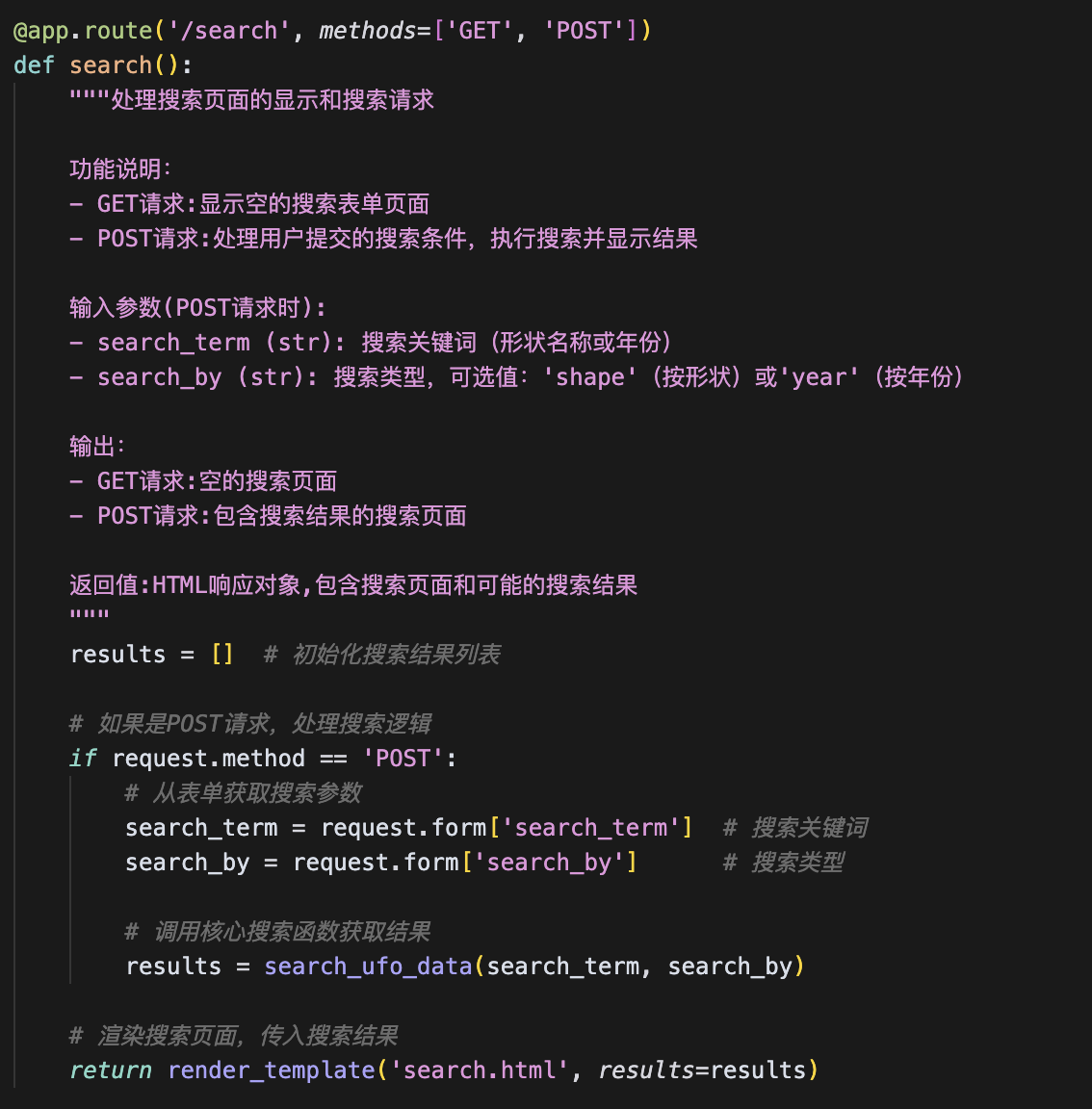
Even without any programming background, you still want to understand the structure of the code the AI wrote for you, so you can judge what needs to change. To do that, ask an AI agent to annotate the whole file. Specifically:
Ask the AI to add comments, and make sure each comment states the inputs, outputs and purpose (the most basic information a programmer gives when commenting a function).
For anything you still don’t understand, ask the AI to explain the logic in more detail.
For example:
Starting to learn programming
Reading code is like reading a foreign language: look up the parts you don’t understand, then piece the whole structure together. Once you know the most basic programming concepts, such as variables, functions and objects, you have what you need to start reading code. Simple tutorials such as Runoob are a good place to start.